
Guide: How to Get Agents to Write Code That Follows Your Team’s Conventions

Martin Zoeller

Not even Fable 5.2 xhigh listens to the instructions in your AGENTS.md. But why not, really?
Back in the spring of this year, I told the participants in my workshop that not every AGENTS.md is equally good: in one experiment, generated AGENTS.md files were less efficient than no AGENTS.md at all, and in some test runs, even handwritten AGENTS.md files did worse than no files.
Several hype cycles have come and gone since then. Model names have higher numbers, Anthropic boss Dario Amodei has greatly expanded his repertoire of existential-dread rhetoric, and frontier models find security vulnerabilities in anything that moves. A lot has changed. Only your AGENTS.md still doesn’t work. Why?
How Closely Do Agents Really Follow AGENTS.md?
At this point, I had planned a list of the most meaningful studies and experiments on the topic. So I did my research. Unfortunately, the results can be summed up as follows: the body of research is weak.
Some reports cover models that are now outdated (Khatri), others provide very small data sets (nine test runs, Agentic AI Foundation). Even in larger experiments, the results aren’t necessarily statistically meaningful, because control groups are missing or the measurements contain substantial errors (Voria et al.).
Since we don’t have solid studies, all we can rely on is what we observe ourselves: in the teams I work with, engineers complain that agents don’t follow the instructions in AGENTS.md. Yet some of these files contain detailed agreements, code style conventions, or contributing guidelines. (In the days before Claude and co., I would have been glad to find such a clear set of rules in my projects!)
But all of this seems to help only so much: agents write code and don’t always stick to these rules while doing so. The result is rework. That causes frustration again and again.
Worse still: if we don’t fix things up, the quality of the software degrades over time, especially if the team also skimps on model choice and Claude Sonnet or GPT Terra regularly takes on important architecture work. It’s easy to conclude that this has long-term economic consequences for the company.
There are ways to prevent this downward spiral.
My AGENTS.md Doesn’t Help. So What Does?
To understand why the following examples work, it helps to keep one thing in mind: when we start a new session, an agent, put very simply, sees this bundle of information:
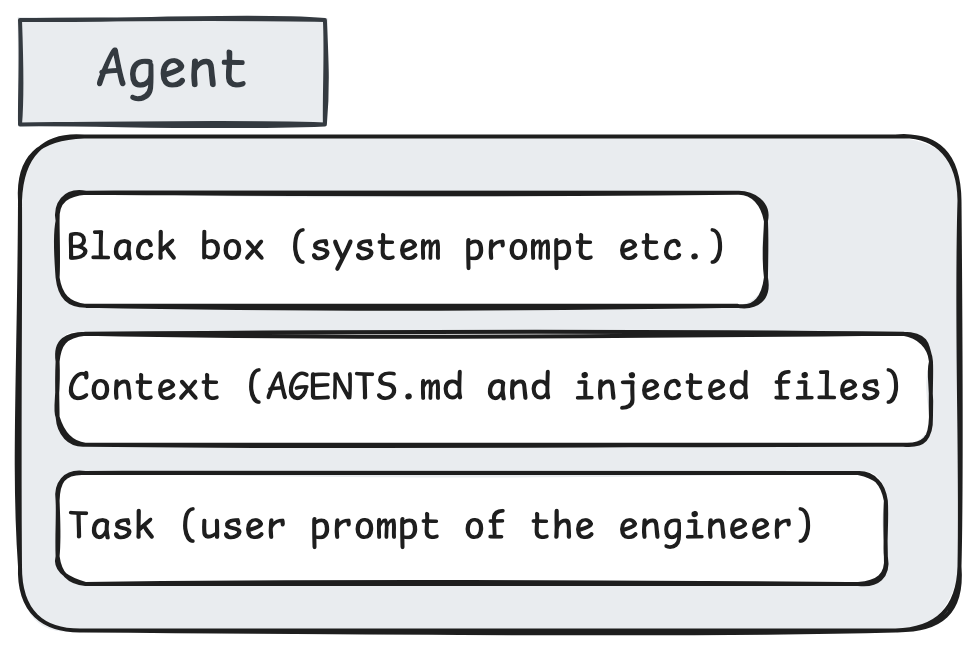
AGENTS.md contains the context for the task. The agent session’s primary goal is to complete the task (a new feature, a bug fix, etc.) while taking the context into account. Let’s assume that the big labs train and optimize their models to complete this task efficiently and satisfactorily.
Our experience shows that the context takes a back seat in the process, since agents sometimes ignore the rules in it. So we can suspect that the context is simply the wrong place for these rules.
So how can we adapt our workflow so that rules sit in the right places and get followed? Here are three examples that work in practice, both for me personally and in larger engineering teams:
1. Deterministic, Static Checks: Stop Hooks and CI (Gates)
If rules live in the context (AGENTS.md), an agent has the choice to follow them or not. It reaches its goal (completing the task) either way, regardless of whether it follows the rules. So we can take that choice away from it, like this:
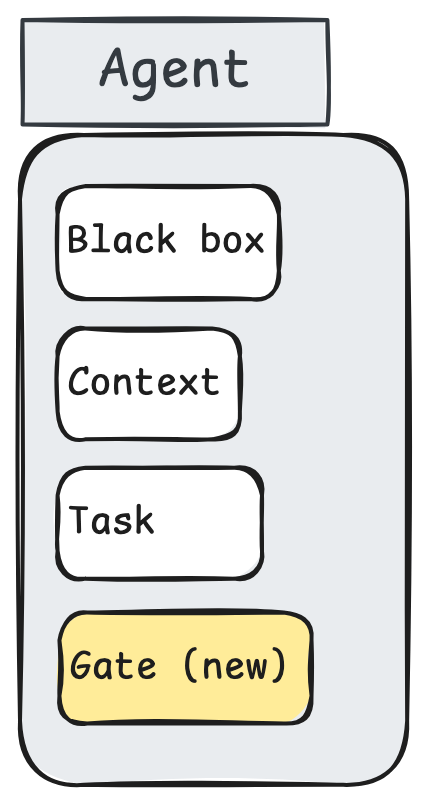
This “gate” can be a stop hook, for example. It runs when an agent thinks it has finished its task. The hook then runs static checks (lint, analyzers, type checks, shell checks, etc.). If they fail, the hook prevents the agent from ending its turn. That forces it to fix its errors. If it can’t fix the errors itself, the hook tells it clearly to report these problems to the user.
Suddenly, we have a way to check deterministically and immediately whether an agent has followed our rules! The only requirements are:
- The checks must be fast enough not to hurt the developer experience.
- The rules must be expressible as static checks.
The simplest approach is to ask: What do I already run in CI today that can also run quickly on my local machine? The answer to this question is the first version of your stop hook.
Important: A stop hook requires engineers to have configured their local environment correctly, so it only complements the checks in CI. It shouldn’t replace running them in CI. CI remains the last line of defense.
2. Skills
Not all checks are static. Not all rules can be expressed as custom analyzer or linter rules. What do I do with checks that require judgment about the content?
Earlier, I said that the agent’s primary goal is to complete the engineer’s task. That’s usually a feature or a bug fix. What if we put another agent on reaching a completely different goal, for example:
Here’s a branch with a change implemented on it. Your task is to check whether the code consistently follows these rules:
<…>
Fix every violation of these rules based on the following criteria:
<…>
This agent’s only task is to apply our rules. It isn’t supposed to build a feature or fix a bug. On top of that, the rules are right there in the user prompt, instead of only in a file that provides general information about the codebase (our AGENTS.md).
Just as ChatGPT isn’t designed to not answer a message from its user, an agent harness isn’t designed to report failure at the end of a session.
Our workflow then looks like this:
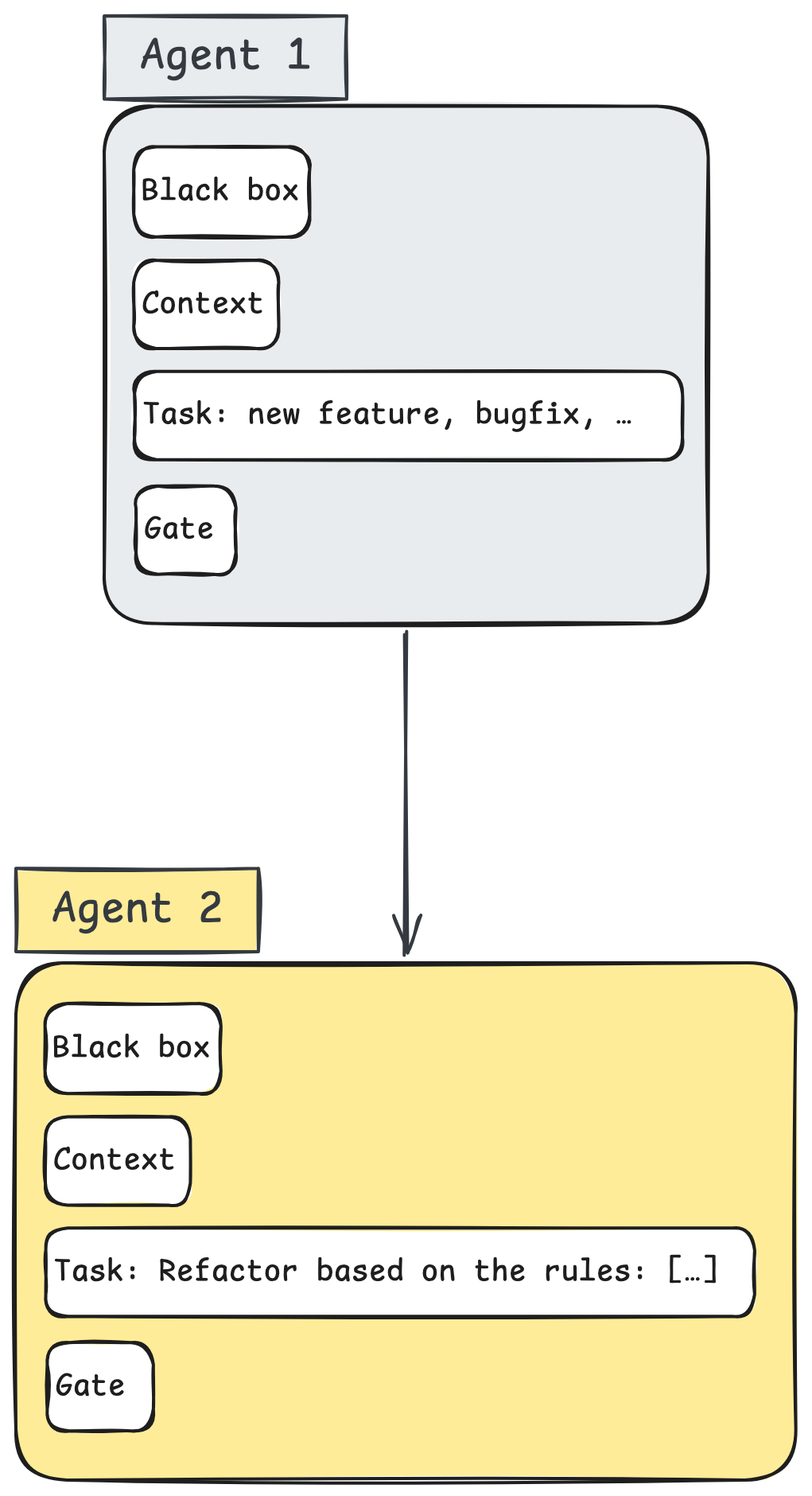
Of course, we don’t want to write the rules into our prompt from scratch every time for this second agent. Besides, we don’t trust it to follow rules from AGENTS.md. So we build a skill that explicitly includes these rules as part of the task and stands on its own.
This way, the rules still live in our codebase, so we can keep defining and improving them together as a team. On top of that, a possibly long list of instructions turns into a simple slash command that’s effortless to run.
Now we have two agents and, with them, a first small workflow. At the very least, we should finish every change with our new skill. Even better would be to formalize this workflow by digging into orchestration and umbrella skills. I’ll cover this topic in more depth in the future, so this article doesn’t get completely out of hand.
3. Subagents: A Brute-Force Example
We now have a deterministic gate. We know that we can use skills to run a “polish pass” or “refactoring pass” on a changeset.
Sometimes that’s not enough. Sometimes only brute force helps. Here’s an extreme example from the past few weeks. Warning: this part may contain traces of a rant.
Claude Opus has a habit of documenting facts in about 14 places in the code instead of one or two. Claude Opus also has a habit of not consistently making changes to that documentation in all of those places. (“Why would anyone document this fact in this place? Of course I didn’t look there!“) In code review, though, Claude Opus is very quick to point out that the documentation wasn’t updated in all places and is therefore out of date.
Static checks can’t clean up documentation. So, in my youthful folly, I followed my own advice and built a docs-cleanup skill that was supposed to make up for this behavior. Besides the rules for cleaning up the documentation, the skill also contains rules on how the documentation should be written (based on Cursor’s unslop skill). My workflow calls it as part of an umbrella skill.
To my astonishment, I found that my own recommendations reach their limits here: Opus’s writing habits are so stubborn that not even that helped. (Side note: Anthropic has failed miserably here since Opus 4.7 and doesn’t seem able to get the problem under control.) At the end of its session, Opus announced that it had fixed the documentation. Yet even in a pull request with fewer than 100 changed lines, I repeatedly found cases where it hadn’t applied the cleanup rules. Only after I pointed it back to the initial prompt (the skill text) several times did Opus 5.5 correct itself.
So does that mean I have to bow to the frontier lab here and accept that the documentation in my project simply turns into unreadable AI slop? Not if I have to work with it 40 hours a week.
Instead of giving Opus a task it can’t complete (“Write in plain English and document things in one place instead of 14”), I replaced the docs-cleanup part of the umbrella skill with:
Start a GPT 6.2 Sol subagent with this prompt. Don’t change the prompt. Accept the subagent’s changes without modifying them again.
The GPT subagent then simply runs the docs-cleanup skill. Opus sometimes can’t resist a comment after the run (“This fact is now documented in only this one place! A reader in another [note: irrelevant] place won’t see it!”), but at least it no longer touches the code comments afterward.
The workflow then looks like this. Agent 1 from the previous example stays the same.
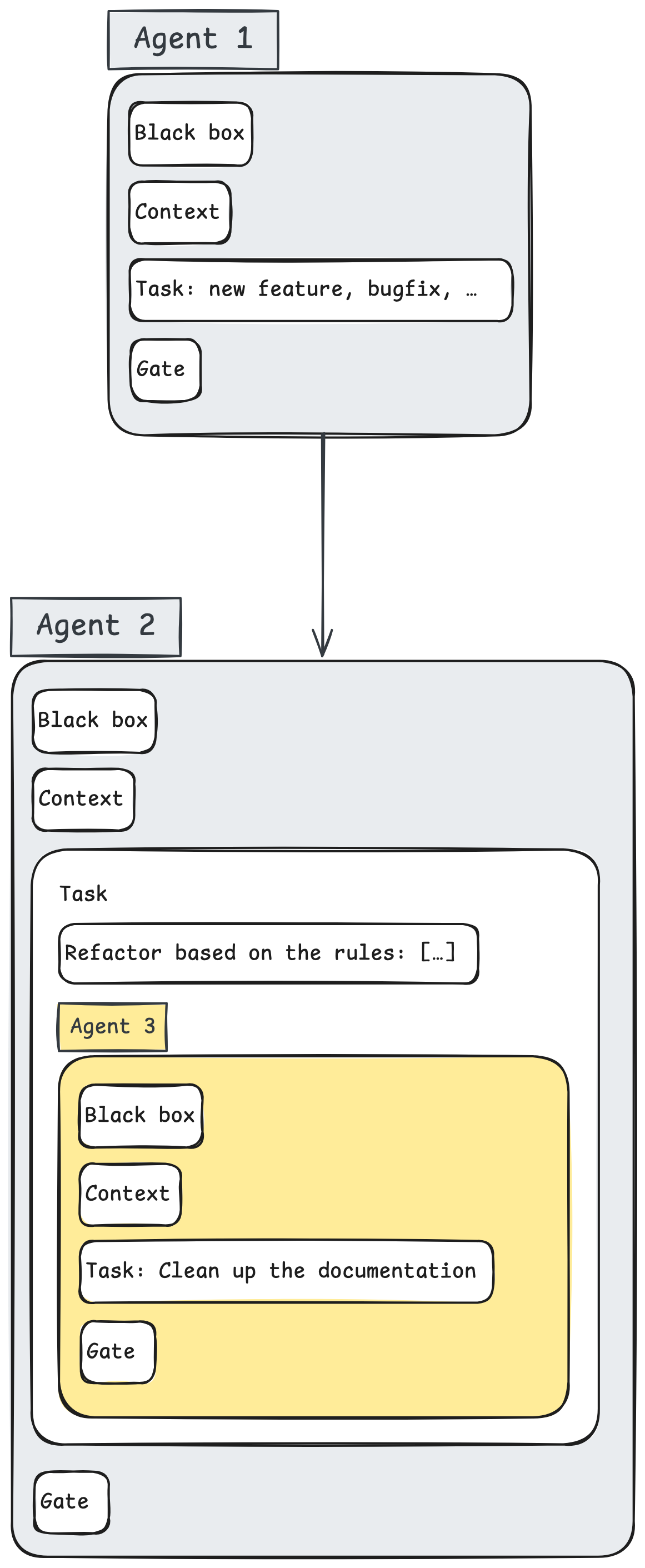
I want to show two things with this:
- There are ways to enforce your own rules, even if it sometimes takes a bit more effort. If this extra step makes my software easier to maintain in the long run, it’s worth the effort.
- A single company shouldn’t dictate to the world what software and documentation have to look like. Especially not when the world can’t see the principles by which that company trains its models. It’s our job as engineers and as companies to shape our work so that we can build the best possible products for our customers. If that means not limiting ourselves to one workflow, one set of rules, or one provider, we should take the trouble to look for alternatives and experiment.
Once we use models from different providers, it’s worth looking at third-party harnesses like T3 Code (my recommendation) or Pi.
Summary: How to Get Agents to Follow Your Rules
We’ve learned how to collect cheap checks in a deterministic stop hook that agents can’t ignore. We’ve also learned how to use skills in separate sessions to make following the rules the primary goal of an agent in our workflow. Finally, we’ve seen how we can use subagents from other providers to make up for the weaknesses of individual models.
For these improvements to take effect in a team, we need to create a foundation on which engineers can try things out, learn, and get better. So here are a few parting suggestions on how you, too, can build software with agents in your team that follows your rules and therefore stays maintainable for you:
- Define the recurring processes in your day-to-day engineering work.
- Identify and discuss recurring problems you have with your coding agents.
- Create first drafts of skills or hooks that solve them. Iterate. The first version doesn’t have to be perfect.
- Combine several skills into umbrella skills, so that you get your first small workflows whose individual parts can still be invoked on their own.
- Make sure agents can find your skills automatically by putting them in the right directories in your projects.
- Fix problems with skills, CI, and hooks as you go. Don’t put these topics in the backlog. Models and harnesses evolve too quickly. Agentic coding tickets in your Jira that are older than three months are certainly outdated by now.
- Copy fast checks from your CI into stop hooks to shorten feedback loops.
- Ask your agents which fast checks could make your current project safer. Have them look for the community’s favorites.
- Write your own linter and analyzer rules, and remove those rules from your AGENTS.md.
- Set up regular (weekly) exchanges between developers! Use them to talk about your experiences with these skills and tools. Collect bugs and suggestions for improvement.
- Appoint one person to own the topic, and give that person (or those people) enough capacity to dig deep into it.
Don’t have time to drive or coordinate this yourself? Find out in a no-obligation intro call how I can help you and your team.
Related Articles
Hand-picked articles on closely related topics.
- An Independent Field Report on CodeRabbit AI: Is It Worth It for Your Team? After dozens of pull requests, I put CodeRabbit AI to the test at a client. Here is what it does well, where it falls short, and the lean review skill I now trust more than any generic tool.
- Claude or Codex: Which AI model fits your team? Claude Opus 5 writes better code than GPT Astra. No, I don't mean Fable.
- How Do We Find Best Practices for Agentic Software Engineering? It has never been easier to feel completely lost as a software engineer.
- Claude Code's Memory Isn't a Feature, It's a Burden If I could change one thing about Claude Code right now, it would be how it handles memories. I'm firmly convinced that the memory system makes Claude Code worse, not better.
Get updates on agentic software engineering
Get notified when I publish new insights about agentic coding in software development. You can unsubscribe at any time.
Your email won't be shared with third parties.